At Griham.io, we automated this entire sequence.

Solvin Babu
Founder of Griham
Featured

Estimating column footings manually is a tedious, multi-step process. In a traditional Excel workflow, a contractor must first calculate the volumetric earthwork for the pit, then the PCC base, and finally—the hardest part—reverse-engineering the RCC (Reinforced Cement Concrete) volume to figure out exactly how many bags of cement, cubic meters of sand, and kilograms of steel are required.
A simple mathematical error in converting RCC volume to material quantities can lead to massive material shortages on site, halting your concrete pour and costing you a day's wages in idle labor.
At Griham.io, we automated this entire sequence. By entering the basic dimensions of your excavation pits into the Column Footings Grid, our Parametric Takeoff Engine instantly calculates your earthwork and uses standardized structural engineering thumb rules to generate a highly accurate, priced material list for your RCC columns.
Here is a detailed breakdown of exactly how to use the Column Footings Grid and what each input field means.
Understanding the Input Fields
All dimensions in the Griham.io Takeoff Wizard must be entered in Meters (m).
1. Type / Desc
This is your identifier for the specific column footing size. Structural drawings usually label these as F1, F2, C1, C2, etc. Grouping them by type allows you to quickly input dimensions for multiple identical columns at once.
2. Nos (N) - Number of Columns
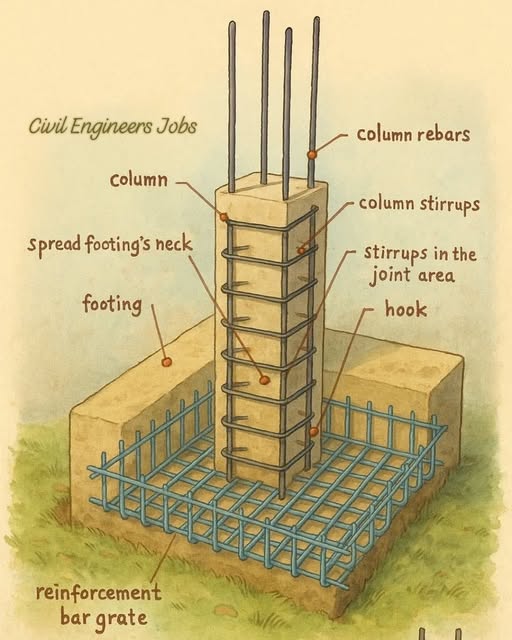
Enter the total count of columns that share this exact footing size.
The Magic: If you have twelve "F1" type footings, you only enter the dimensions once. The engine will instantly multiply all subsequent volumetric and steel calculations by this number.
3. Len (L) - Length of the Pit
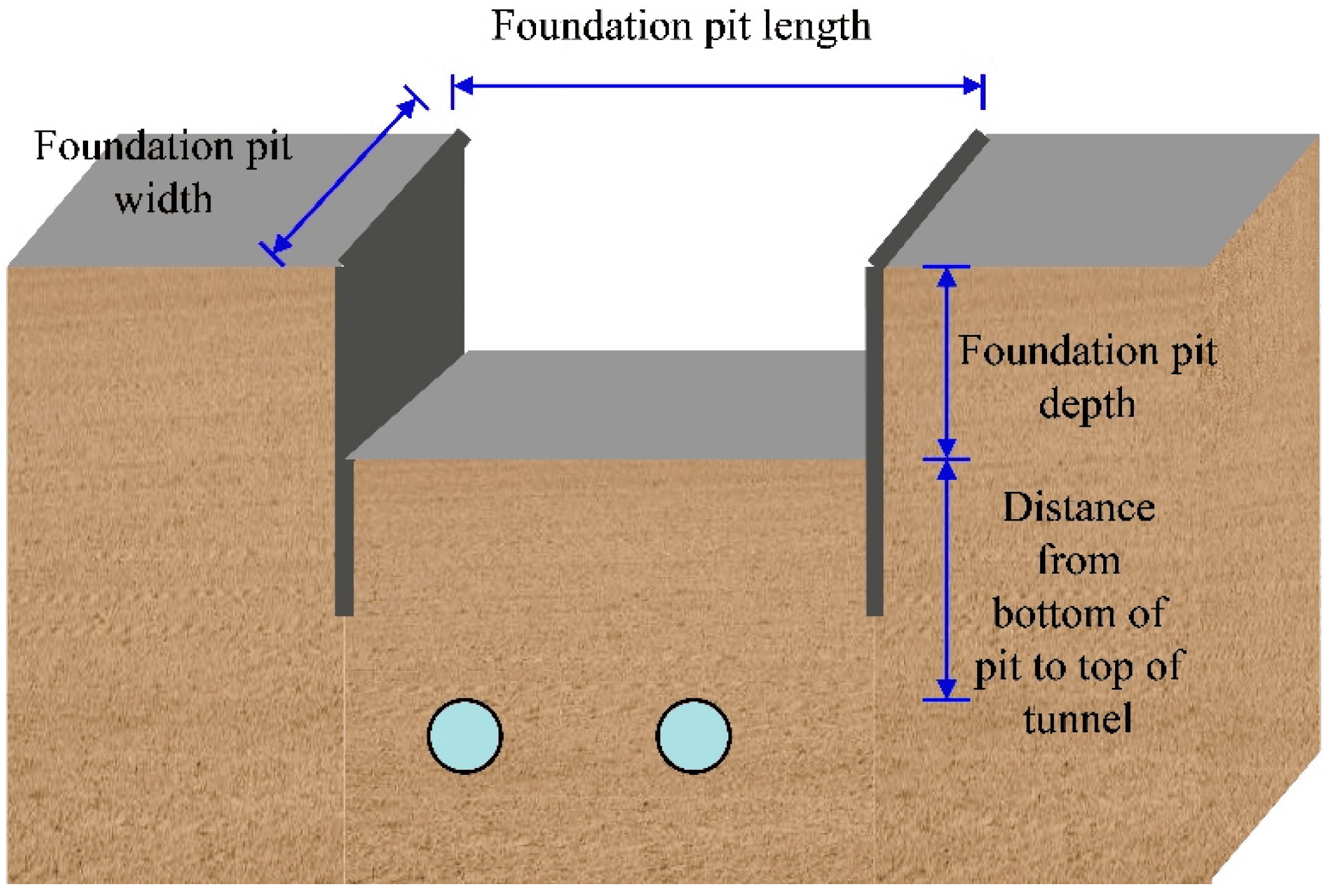
The total length of the earthwork excavation pit required for the footing. Ensure you include the working space buffer (usually 15-30cm extra on all sides of the actual concrete footing) as specified in your architectural plan.
4. Brd (B) - Breadth of the Pit
The total width of the earthwork excavation pit. Together with the length, this defines the footprint of both your excavation and your PCC base course.
5. Depth (D) - Excavation Depth
The total depth of the pit from the existing ground level down to the hard strata. The engine multiplies N × L × B × D to calculate your total Earthwork Excavation volume in cubic meters (m³).
6. PCC (D2) - PCC Base Depth
This is the thickness of the unreinforced concrete leveling course poured at the very bottom of the pit (typically a 1:4:8 mix). For a standard 15cm thick bed, you would enter 0.15.
7. Waste% - Wastage Percentage
Concrete spills, steel is cut, and pits are rarely dug to perfect mathematical dimensions. This column defaults to 5%, meaning the engine calculates the pure theoretical volume and then adds a 5% safety buffer to your final BOQ. This ensures you do not run out of cement or steel during an active pour.
What Does the Engine Generate?
This is where Griham.io separates itself from basic spreadsheet templates. When you click "Calculate & Add to Staging", the engine doesn't just give you raw volumes. It runs structural density algorithms to break those volumes down into purchasable materials.
From this single row of inputs, the engine instantly generates 7 highly specific BOQ items:
Earthwork for Column Pits (m³): The total volume of soil to be excavated.
PCC Base for Columns (m³): The precise volume for your leveling course.
Cement (Bags): Using a standard residential column size (300mm x 300mm x 3m height), the engine calculates the total RCC volume and converts it into the exact number of 50kg High Strength 53 Grade cement bags required.
M-Sand (m³): Extracts the fine aggregate requirement from the concrete mix design.
Baby Metal 20mm (m³): Extracts the coarse aggregate requirement.
TMT Steel Reinforcement (Kg): Using a structural engineering standard of 160 kg of steel per cubic meter of column concrete, it calculates the exact tonnage of TMT bars you need to order.
Binding Wire (Kg): Automatically calculates the tie wire required (standardized at 1% of the total steel weight).
Stop Guessing Concrete Ratios
You no longer need to be a structural engineer to estimate material requirements accurately. The Column Footings Grid handles the heavy density math in the background, allowing you to focus on managing your site and winning more bids.
By translating raw pit dimensions into exact quantities of cement, sand, and steel, Griham.io ensures your foundation phase is budgeted flawlessly.
Ready to move up to the superstructure? Read our guide on [Step 3: The "Smart Wall" Deductions].